The aspect ratio dial and digital tele-converter selector on the Fujifilm GFX100RF
Two dedicated physical controls that make up for the lack of a zoom on this fixed 28mm-lens medium format camera.
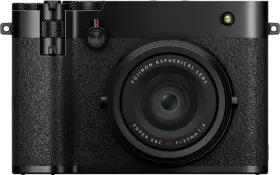
A fixed lens, offset by two physical dials
The GFX100RF comes with a fixed 28mm-equivalent lens, with no optical zoom available. To compensate, the camera offers two dedicated controls right on the body: the digital tele-converter selector and the aspect ratio dial.
The digital tele-converter selector
This dial changes the effective focal length by digitally cropping the image, with three steps available: 45mm (36mm equivalent), 63mm (50mm equivalent), and 80mm (63mm equivalent), plus the OFF position corresponding to the native 28mm focal length. The setting also remains accessible from the photo menu, under Shooting Setting > Digital Tele-Conv.
The aspect ratio dial
This second dial lets you rotate through the image aspect ratio directly while shooting, among nine options: 4:3, 3:2, 16:9, 65:24, 17:6, 3:4, 1:1, 7:6, 5:4, plus a C position that leaves the ratio choice to the command dial. Changing the aspect ratio shifts the position and size of the black area marking the part cropped out of the final frame — a direct visual reference for composing before you even press the shutter.
This guide is about
Fujifilm GFX100RF Digital Camera