Installing an LG OLED TV: placement, ventilation, and wall mounting
Why a poorly ventilated spot can damage the set, and the precautions to follow for safe wall mounting.
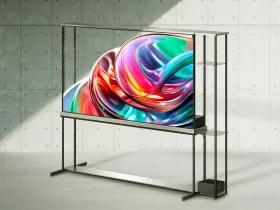
Choosing a properly ventilated spot
Never install the TV in a confined space such as an enclosed bookcase, or on a carpet or cushion that could block airflow. Never cover the device with cloth or other material while it stays plugged into power — the ventilation openings can get hot during extended use, so it's best to avoid direct contact there.
A minimum gap to respect against the wall
When standing on furniture, leave at least 10 cm of clearance between the back of the TV and the wall, to ensure proper ventilation.
Wall mounting — best left to a professional
LG recommends having wall installation carried out by a qualified professional installer, and suggests using its own wall mount, which is easier to move once cables are connected. If a bracket from another brand is used, it must guarantee the device is properly secured to the wall while leaving enough room to connect external devices. It's advisable to connect all cables before the final installation of a fixed wall mount, and to remove the TV's stand before proceeding with wall mounting.
What should never be overlooked
If the device is mounted to a building material other than a solid wall perpendicular to the floor, contact a qualified professional. The wall mount must always be secured carefully enough to prevent the device from falling.
This guide is about
LG Signature OLED T 77 inch Ultra HD 4K Smart OLED TV