Buying guide for the best mini PCs of 2026: how to choose
Power, connectivity, cooling: choosing a mini PC isn't just about comparing prices. This guide walks you through the criteria that really matter for your use case, so you can avoid unpleasant surprises.
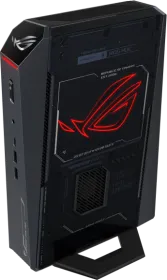
🖥️ Buying guide for the best mini PCs of 2026
Tired of a tower cluttering the space under your desk, but worried that a "compact" computer means sacrificing power? That's exactly the dilemma the latest generation of mini PCs solves. Once reserved for basic office tasks, they now rival real towers for most uses, all while fitting in the palm of your hand.
But the market has become more complex: between office-oriented models, ones built for compact gaming, and configurations designed for professionals, choosing the best compact computer isn't something to leave to chance. This guide explains, without unnecessary jargon, what actually separates a good mini PC from a bad purchase.
Why choose a mini PC over a tower or a laptop?
The mini PC occupies a unique spot between the desktop tower and the laptop. It has neither a built-in screen nor a battery, but it keeps the core advantages of a fixed workstation while cutting the footprint by a factor of ten.
Three profiles get real value from it:
- The remote worker who wants a genuine fixed workstation without taking over their desk or running a tangle of cables.
- The household setting up a living room as a silent media center, capable of streaming in 4K without any noise.
- The casual gamer or creator who wants serious power in a format that slips behind a screen.
Conversely, if you need hardware upgradability over several years (swapping the graphics card, adding storage at will), a classic tower remains better suited: almost all mini PCs close that door once purchased.
The processor: the criterion that determines everything else
This is where most of the price difference — and real performance difference — is decided. The mini PC processor should be chosen based on your use case, not the number printed on the box.
For office work and browsing
An entry-level or mid-range processor is more than enough: web browsing, office suites, video calls, and video streaming don't demand extreme power. This is where the best deals in cheap mini PCs are found.
For professional multitasking
Development, light photo editing, several applications open at once: here, prioritize a more recent processor with a high core count. The difference is felt mainly when several tasks run at the same time, not on a single isolated application.
For compact gaming
A gaming mini PC needs a dedicated graphics chip, not just a good processor. The latest models now integrate real mobile graphics cards capable of running recent games under good conditions — a segment that barely existed just a few years ago.
RAM and storage: don't underestimate this criterion
Unlike the processor, RAM and storage are sometimes upgradable on a mini PC — but not always. This is a point to check before buying, not after.
- 8GB of RAM: the strict minimum today, reserved for very basic use.
- 16GB of RAM: the sweet spot for most uses, including everyday multitasking.
- 32GB and more: needed for video editing, heavy development, or demanding gaming.
On the storage side, an SSD is a prerequisite today, not an option — the difference in speed on startup and when opening applications is considerable compared to a mechanical hard drive, which has virtually disappeared from this product category.
Cooling: the invisible criterion that changes everything
This is probably the point most often overlooked by buyers, and yet one of the most important. A mini PC packs significant power into a tight case, which poses a real thermal challenge.
Poorly designed cooling causes two concrete problems: an automatic drop in performance after a few minutes of sustained load (a phenomenon called throttling), and fan noise that can become bothersome in a quiet living room or office setting. Before buying, look for user feedback on temperature and noise under prolonged load rather than relying solely on the spec sheet.
Connectivity: check that it matches your real use case
To reduce their size, some manufacturers cut back on the number of available ports. Before buying, list everything you need to keep permanently connected:
- Number and type of screens you plan to use simultaneously
- USB ports needed for your peripherals (keyboard, mouse, external drive, webcam)
- Presence of an Ethernet port if your Wi-Fi isn't reliable
- Compatibility with your existing display cables (HDMI, DisplayPort, USB-C)
Comparison table: key criteria by profile
| Criterion | Office use | Professional use | Compact gaming |
|---|---|---|---|
| Processor | Entry/mid-range | Recent, multiple cores | High-end |
| Graphics card | Integrated is enough | Integrated or light dedicated | Dedicated required |
| Recommended RAM | 8-16GB | 16-32GB | 32GB and up |
| Storage | 256-512GB SSD | 512GB+ SSD | 1TB+ SSD |
| Budget priority | Cheap mini PC | Reliability and multitasking | GPU power |
Mistakes to avoid before buying
Relying solely on the listed price. A very cheap mini PC often skimps on cooling or component quality — a bad trade-off if the device needs to run for several hours a day.
Ignoring real upgradability. Some models let you add RAM or extra storage after purchase, others don't. If this matters to you, check it before paying, not after unboxing.
Forgetting about the operating system. Some mini PCs are sold without a Windows license installed, which can add a hidden cost to factor into your overall budget.
Conclusion: how to make the right choice
The best mini PC isn't the one with the most power listed on paper, but the one that precisely matches your real use case. For everyday office work, don't pay for power you'll never use. For gaming or demanding creative work, on the other hand, don't skimp on RAM or cooling to save a few dozen euros — these are precisely the factors that determine whether your mini PC stays comfortable to use two years from now, or becomes frustrating within the first few months.
Take the time to list your real needs before comparing spec sheets: it's the most reliable way to avoid both overpaying and finding yourself limited too soon.